If you’ve been scrolling through Instagram or TikTok lately, you’ve probably noticed everyone transforming into Spider-Man. No, it’s not a new movie trailer—it’s the biggest AI photo trend of 2026, and honestly? It’s pretty incredible.
Creators everywhere are using ChatGPT’s image generation to turn ordinary selfies into cinematic Spider-Man portraits that look straight out of a Marvel movie poster. The best part? You don’t need Photoshop skills or expensive editing software. Just a photo, a good prompt, and a few minutes.
In this guide, I’ll walk you through exactly how to create your own realistic Spider-Man AI photos that’ll make your followers do a double-take.
What Exactly Is Spider-Man AI Photo Editing?
Here’s the magic behind it: artificial intelligence takes your regular photo and recreates it with a Spider-Man-inspired outfit, movie-quality lighting, realistic textures, and stunning backgrounds—all while keeping your face recognizable as you.
The result looks professional, polished, and straight out of a comic book movie. And the best part? You don’t need to know a single thing about photo editing to pull it off.
What You’ll Need Before You Start
Before we dive in, let’s make sure you have everything ready:
- ChatGPT with image generation (the latest version works best)
- A clear selfie or portrait (the clearer, the better)
- Good lighting in your original photo (natural light is your friend here)
- A stable internet connection (patience is key while it generates)
That’s it. No expensive cameras. No complicated software. Just you and your phone.
Step-by-Step Guide to Creating Your Spider-Man AI Photo
Step 1: Open ChatGPT
Launch the ChatGPT app or open it in your browser and start a new chat. Make sure you’re using the version that supports image generation (the latest update in 2026 has made this incredibly smooth).
Step 2: Upload Your Photo
Upload a high-quality portrait where your face is clearly visible. Pro tip: photos with good lighting and a simple background tend to produce the best results. The AI works better when it can clearly see your facial features.
Step 3: Paste Your Prompt
This is where the magic happens. The prompt is essentially your instruction manual for the AI. You need to be detailed about what you want.
Here’s an example prompt you can use or customize:
Prompt Example:
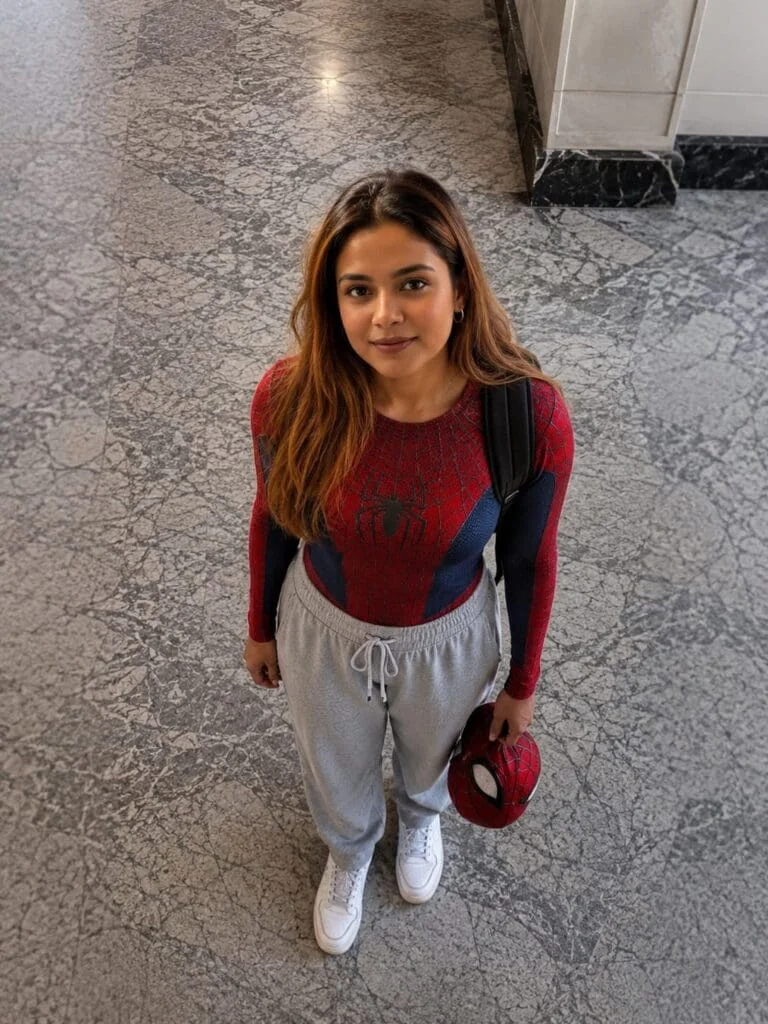
“Ultra-realistic cinematic portrait of a young South Asian woman standing indoors on a polished gray marble floor, viewed from a high-angle top-down perspective as if photographed from an upper floor. She is looking directly into the camera with a warm, gentle smile and expressive dark brown eyes. She has shoulder-length wavy light-brown hair with a center part, natural glowing skin, subtle makeup, and small silver hoop earrings. She is wearing a fitted red-and-blue Spider-Man-inspired compression top with a realistic web pattern and spider emblem, light gray oversized jogger sweatpants with drawstrings, clean white sneakers, and a black backpack over both shoulders. In her right hand, she is casually holding a red Spider-Man mask. The setting is a modern indoor lobby with large polished marble tiles, soft ambient lighting, and a clean minimalist background. The composition is centered with full-body framing, natural body proportions, realistic textures, soft cinematic color grading, shallow depth of field, ultra-detailed skin, sharp facial focus, 85mm lens look, HDR, photorealistic, high dynamic range, premium DSLR quality, 8K, highly detailed, Instagram lifestyle photography, natural lighting, editorial fashion style, no watermark, no text.”
Here’s another great prompt option with a different vibe:
“A realistic high-angle full body shot of a young man with messy, textured black hair looking up at the camera. He is dressed in a red and blue Spider-Man bodysuit on his upper half, but wearing loose casual gray sweatpants on his lower half, with white clean canvas shoes. He has a black backpack on his shoulder and is holding a red Spider-Man mask in his left hand. He is standing indoors on a gray marble tiled floor. The lighting is soft and natural, giving a casual ‘Peter Parker after school’ vibe.”
Important: Don’t Forget the Negative Prompt!
This is just as crucial as your main prompt. It tells the AI what you don’t want to see:
“low quality, blurry, deformed face, extra fingers, bad anatomy, duplicate limbs, cartoon, CGI, oversaturated, noisy, watermark, logo, text, cropped feet, distorted eyes, unrealistic skin, low resolution, artifacts.”
Step 4: Let the AI Work Its Magic
Hit generate and wait a few moments. ChatGPT will create your Spider-Man-inspired photo based on your prompt and uploaded image. I usually generate a few different versions to pick the best one.
Step 5: Download and Share
Once you’re happy with a result, download the image and share it on Instagram, Facebook, WhatsApp—anywhere you want to show off your superhero alter ego!
Pro Tips for Better Results
After experimenting with dozens of these photos, here are my best tips:
- Use the highest resolution image you have. The AI works better with more detail to work with.
- Make sure your face is clearly visible. Hats, sunglasses, or weird angles can confuse the AI.
- Avoid blurry photos. If your original image is blurry, your AI result will be too.
- Natural lighting is your best friend. Photos taken in good natural light produce much more realistic results.
- Keep the background simple in your original photo. A cluttered background can distract the AI from focusing on you.
- Generate multiple versions. Don’t settle for the first result. Generate 3-5 versions and pick the absolute best one.
- Experiment with different poses and settings. Try action poses, casual poses, city backgrounds, indoor settings—the possibilities are endless!
Why Is Everyone Obsessed With This Trend?
Look, I get it. Another AI trend? But honestly, Spider-Man AI photos are different. They combine the cool factor of a superhero with realistic, everyday photography. The results are attention-grabbing, fun to share, and perfect for social media profiles and Instagram reels.
There’s something magical about seeing yourself transformed into a superhero. It’s like being in a movie for a moment. And in a world where everyone’s looking for fresh content, these photos stand out in a crowded feed.
Frequently Asked Questions
Is Spider-Man AI Photo Editing free?
Many AI tools offer free image generation with daily limits. ChatGPT has both free and premium options. The free version usually lets you generate a certain number of images per day, while premium plans provide faster generation and higher limits.
Can I use my own photo?
Absolutely! In fact, that’s the whole point. Uploading your own image gives you the most personalized and realistic result.
Do I need Photoshop?
Nope! ChatGPT handles everything for you. No editing skills required.
Which photo works best?
A clear, well-lit portrait where your face is fully visible. Front-facing shots tend to work better than side profiles, but feel free to experiment!
Final Words
Spider-Man AI Photo Editing is honestly one of the most fun and creative uses of AI I’ve seen in 2026. It takes your ordinary photos and transforms them into something cinematic and unforgettable. With the right prompt and a clear photo, you can create realistic AI images in just a few clicks.
Don’t be afraid to experiment with different poses, outfits, and backgrounds. The more you play around with it, the better your results will get. And who knows? You might just discover your inner superhero.
Related Reading:
- 10 Best AI Photo Editing Prompts for Beginners
- How to Create Cinematic AI Portraits for Social Media
- ChatGPT Image Generation Guide: Tips and Tricks