
Have you been scrolling through Instagram lately and seen those dreamy, ultra close-up couple eye photos everywhere? You know the ones I’m talking about – where two people’s eyes are merged together in one stunning,
cinematic frame. This is the AI Eye Matching Prompt trend, and it has taken over social media in 2026.
Thousands of couples across India are using this trend to turn ordinary selfies into magazine-style portraits. It’s romantic, it’s artistic, and honestly, it looks like it was taken by a professional photographer. But here’s the secret – it’s all done with AI.
In this guide, I’ll explain exactly what the AI Eye Matching Prompt is, why it’s going viral, and how you can create your own hyper-realistic couple eye photo using ChatGPT.
I’ll share the exact prompt, the best settings, common mistakes to avoid, and answers to the most asked questions about this trend.
Whether you’re a couple wanting a romantic keepsake or a content creator chasing the next viral post, this guide has everything you need.
What Is the AI Eye Matching Prompt?
Let me break this down in simple terms. The AI Eye Matching Prompt is a text instruction you give to an AI image tool that combines two separate eye photos – usually one from a man and one from a woman – into a single, hyper-realistic, ultra close-up couple portrait.
Instead of showing full faces, this trend focuses only on the eyes, eyebrows, and a small area of skin around them. The result looks like a professional DSLR macro shot with:
- Sharp, detailed eyelashes
- Natural skin pores and texture
- Soft cinematic lighting
- Beautiful catchlight reflections in the iris
This is different from a normal AI couple photo prompt because it isolates the most emotional and expressive part of the human face – the eyes – and blends two people’s features into one romantic frame.
That emotional close-up quality is exactly why this trend has become so popular in early 2026.
Why This AI Trend Is Going Viral
There are several clear reasons the AI Eye Matching Prompt has exploded across Instagram, Pinterest, and WhatsApp statuses this year.
1. It Feels Personal and Romantic
Unlike generic AI filters, this trend uses your own actual eye photos. The output still feels authentic and personal rather than a random AI-generated stranger.
2. It Photographs Beautifully on Mobile Screens
The ultra close-up, hyper-realistic style is perfectly suited for Instagram Reels covers, story highlights, and profile pictures.
3. Zero Technical Skill Required
You don’t need Photoshop or any advanced editing software. A single, well-written prompt inside ChatGPT can generate the entire image.
4. It Works for Every Couple
From newly engaged couples to long-married partners, this trend is being used for anniversaries, engagement announcements, and even sibling or friendship photos.
This trend has become especially popular in tier-2 and tier-3 cities, proving that viral AI photo trends are no longer limited to metro audiences.
Features of the AI Eye Matching Prompt
Here are the key features that make this prompt stand out from other AI photo prompts:
- Ultra close-up eye composition – Focuses only on the eyes and eyebrow area
- Hyper-realistic DSLR-style output – Similar to a macro lens photograph
- Natural skin texture – Visible pores, no plastic or over-smoothed AI look
- Sharp eyebrow and eyelash detailing – Every hair is visible
- Soft cinematic lighting – Mimics golden-hour or studio softbox lighting
- Realistic eye reflections – Tiny catchlights inside the iris
- Romantic couple composition – Blends two individual eye photos into one frame
- Ultra HD 8K quality – Crisp, print-ready results
- Instagram premium aesthetic – Ready to post directly without further editing
This combination of technical realism and emotional storytelling is what makes the AI Eye Matching Prompt different from a basic realistic couple eye photo filter.
How the Eye Matching Process Works
This is the most important part of the trend, so let me explain it clearly.
To create your AI Eye Matching photo, you need two separate close-up images:
- One clear photo of the male partner’s eye – Taken in good natural light, camera held close and steady
- One clear photo of the female partner’s eye – Taken the same way
Once you upload both images into ChatGPT along with the prompt, the AI analyzes:
- The eye shape and color of both individuals
- The eyebrow pattern and thickness
- The natural skin tone and texture around the eye
- Lighting conditions in each original photo
It then merges these details into one seamless, symmetrical composition – usually a side-by-side or mirrored frame. The final image looks like both partners are looking into the camera together in one professional photoshoot, even though the two original photos were taken separately.
This is what separates a genuine AI Eye Matching Prompt result from a basic close-up eye prompt. The AI is not just generating random eyes – it’s matching and blending two real identities into one hyper-realistic couple portrait.
The Complete AI Eye Matching Prompt
Below is the complete, tested prompt that you can copy and use directly inside ChatGPT’s image generation feature.
Copy this exact prompt:
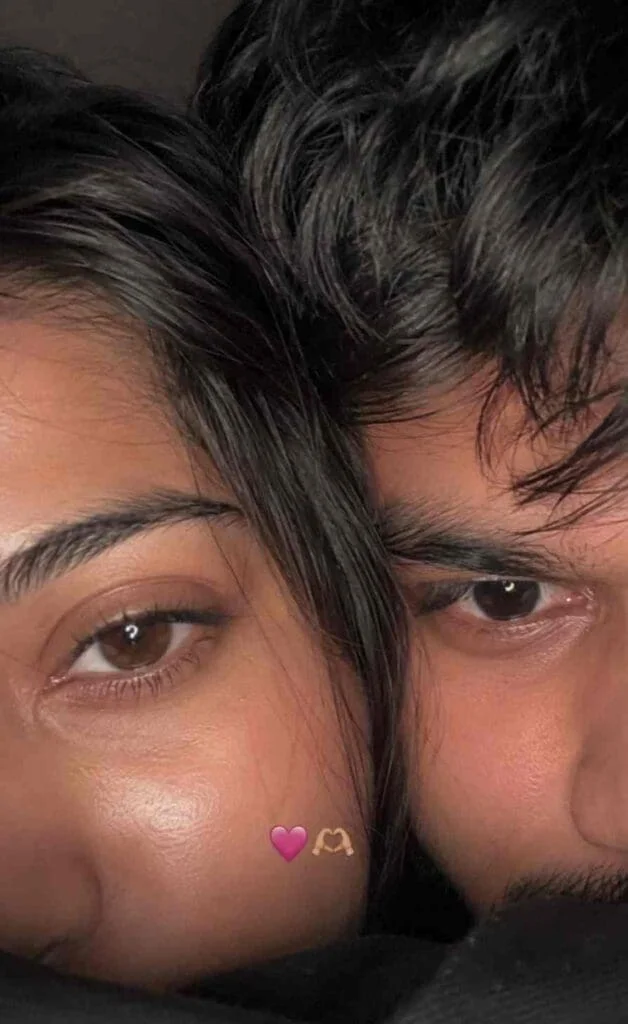
Use 100% of both faces above the image uploaded. Must look exactly like a real iPhone front camera flash selfie uploaded to Instagram, not an AI-generated image. Preserve natural imperfections, realistic skin pores, sensor noise, slight blur, imperfect framing, and authentic smartphone camera artifacts.
Create an ultra-realistic candid smartphone selfie of two young people with only the upper half of their faces visible, framed extremely close to the camera. Their faces are pressed together naturally, creating an intimate, cozy composition. The left person shows one eye with long natural eyelashes, while the right person has soft messy black bangs partially covering one eye. Warm hazel-brown eyes with realistic reflections, natural skin texture with tiny pores, faint acne marks and subtle imperfections. Soft black hair with loose strands falling across the face.
Low-light indoor environment with a phone flash, soft overexposed highlights, slight motion blur, shallow depth of field, subtle lens softness, realistic digital camera noise, authentic smartphone HDR processing, imperfect focus, natural color tones, cozy late-night aesthetic. A tiny pink heart emoji and heart-hands emoji are placed between both faces.
Vertical 9:16 composition, looks like an accidental Instagram story/photo taken on an iPhone, completely photorealistic, raw, unedited, cinematic, no beauty filter, no AI look, no plastic skin, no oversharpening, no extra details, indistinguishable from a real phone photo.
Step-by-Step Guide: How to Generate Your AI Eye Matching Image
Step 1: Take Two Clear Eye Photos
Capture close-up shots of both partners’ eyes in good lighting. Daylight or soft indoor light works best. Make sure the camera is steady and focused directly on the eye.
Step 2: Open ChatGPT with Image Generation Enabled
Make sure you’re using a ChatGPT version that supports image uploads and image generation.
Step 3: Upload Both Images Together
Attach the male eye photo and female eye photo in the same conversation.
Step 4: Paste the AI Eye Matching Prompt
Use the exact prompt shared above. Don’t change it unless you know what you’re doing.
Step 5: Review the Generated Image
Check for realistic skin texture, sharp eyebrow details, and natural eye reflections.
Step 6: Regenerate If Needed
If the first result looks too artificial, ask ChatGPT to “make the skin texture more natural” or “increase eye reflection detail” for a second attempt.
Step 7: Download and Share
Save the final image and post it on Instagram, WhatsApp, or Pinterest.
Best AI Settings for Realistic Results
| Setting | Recommended Value | Why It Matters |
|---|---|---|
| Resolution | Ultra HD / 8K | Produces sharp, print-quality detail |
| Lens Style | 85mm DSLR macro | Creates natural background blur and realism |
| Lighting | Soft cinematic / golden hour | Avoids harsh, flat AI lighting |
| Skin Texture | Natural, visible pores | Prevents plastic or over-smoothed skin |
| Color Grading | Warm, natural tones | Keeps skin tone accurate to original photos |
| Depth of Field | Shallow | Focuses attention on the eyes only |
| Output Style | Photorealistic | Maintains authenticity |
Pro Tips for Professional AI Eye Photos
Use Natural Daylight
Natural light gives the most accurate skin tones and eye colors. Avoid artificial yellow light.
Keep the Camera Steady
Hold the camera very still and focus directly on the eye. Blurry photos confuse the AI.
Avoid Heavy Makeup
Minimal makeup gives the AI a more accurate baseline to work with.
Mention Natural Skin Texture
Always include “natural skin texture” in your prompt to avoid the fake, overly smooth AI look.
Ask for Cinematic Lighting
“Cinematic lighting” gives a more romantic, premium result than “bright lighting.”
Generate Multiple Versions
Create 2-3 variations and pick the most realistic one.
Add Instagram Aesthetic Keywords
Words like “Instagram premium aesthetic” help get social-media-ready output.
Common Mistakes to Avoid
❌ Uploading Blurry Photos
Low-quality photos confuse the AI’s texture mapping and give poor results.
❌ Skipping “Photorealistic”
Without this keyword, the AI often generates cartoonish or artistic images instead of realistic ones.
❌ Not Mentioning Skin Texture
This leads to overly smooth, plastic-looking skin.
❌ Using Edited Original Photos
Heavily filtered photos change the natural eye color and skin tone, confusing the AI.
❌ Forgetting 8K/Ultra HD
This lowers the final image quality significantly.
❌ Combining Unrelated Eye Angles
One eye looking left and the other looking straight breaks the symmetry of the composition.
Frequently Asked Questions
Q: What is an AI Eye Matching Prompt?
It’s a specific ChatGPT prompt that merges two individual eye photos into one hyper-realistic, close-up couple portrait focused entirely on the eyes.
Q: Is the AI Eye Matching Prompt free to use?
Yes, if you already have access to ChatGPT’s image generation feature, you can use this prompt without any extra cost.
Q: Do I need professional photography skills?
No. You only need two clear, well-lit close-up eye photos taken from a regular smartphone camera.
Q: Can I use this prompt for friends or siblings?
Yes, the same prompt works for friends, siblings, or any two people who want a matching eye portrait.
Q: Why does my AI eye photo look fake or plastic?
This usually happens when the prompt doesn’t mention “natural skin texture” or when the original photos are low resolution.
Q: Which app is best for this trend?
ChatGPT with image generation support is currently the most popular and reliable tool.
Q: How long does it take to generate the image?
Typically less than a minute, depending on server load.
Q: Is this trend safe for privacy?
Only upload your own photos or photos you have permission to use. Avoid unknown or unverified AI tools.
Q: Can I edit the AI-generated eye photo further?
Yes, you can use basic photo editing apps to fine-tune brightness or color after generating the base image.
Q: Where can I find more viral AI prompts?
Bookmark our website for the latest AI photo prompt guides.
Final Thoughts
The AI Eye Matching Prompt trend is a beautiful example of how simple AI tools can create emotionally powerful, hyper-realistic art from everyday photos. With the right prompt, good lighting, and a little patience, any couple can create a stunning, Instagram-ready close-up portrait without any professional photography equipment.
As AI photo trends continue to evolve through 2026, we’ll keep bringing you the latest, most accurate, and easy-to-follow tutorials. So go ahead – take those eye photos, use the prompt, and create something beautiful.